Is this the same as extracting pictures from a PDF?
No. Each result is a rendered view of an entire selected page, including its text and graphics.
Render selected PDF pages as separate images. Choose a format and resolution for previews, slides, or an image-only copy.
No signup · File contents stay on this devicePDF documents · files stay on your device
Up to 20 files · 25 MiB per file · 80 MiB total
Processing happens in your browser. File contents are not uploaded. Close the tab to release active files; temporary handoffs use local browser storage. · Privacy details
Measured with the listed sample and settings; these may differ from this page’s starting preset. Timings are individual processing-function runs in the stated environment and exclude page loading. Library caches may be warm. These small-file checks do not establish performance or compatibility for every document.
| Sample | Settings | Observed output | Environment |
|---|---|---|---|
| sample-document.pdf (3 pages; 2,246 bytes) ↗ | PNG; all pages; longest edge 1600 px | approximately 82.3 KB; 1131 × 1600 · 0.10 sec | approximately 83.6 KB; 1131 × 1600 · 0.13 sec | approximately 84.0 KB; 1131 × 1600 · 0.15 sec | Chrome · Apple M2 / macOS · 15 Oct 2026 · local test |
Using this tool
Before you start
Render only the pages needed for the next task. Set the longest edge in pixels; the other dimension follows the page proportions. A thumbnail needs fewer pixels than a slide or close inspection. Check fine print after export.
A page image is convenient for a preview, but it cannot replace searchable text, accessibility tags, hyperlinks, or a signed original. Retain the source PDF for those uses.
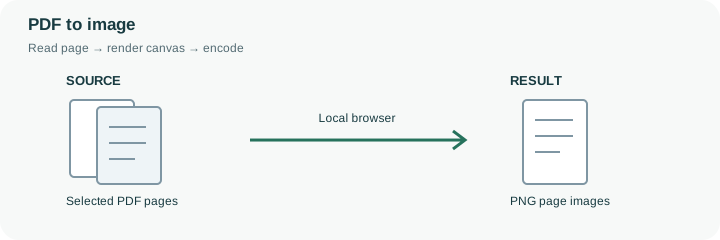
Rendering a PDF page is useful for a slide, a reference screenshot or a thumbnail. The browser reads the page’s drawing instructions and paints the visible page onto a canvas, then exports that canvas as JPG or PNG. This is different from extracting the original photograph embedded somewhere inside a PDF: the result includes the whole rendered page, including text, lines and margins.
For example, enter 2,4-6 to create previews of four selected pages. A longest edge of 1600 pixels applies to each page separately, so a landscape and portrait page receive different widths and heights. Choose PNG for line drawings and compare JPG for photographic pages. Keep the original PDF whenever searchable text, bookmarks, links, selectable wording or accessibility reading order is important. A visible signature in the picture is only an appearance and cannot authenticate the document. Read any rendering error rather than assuming a missing or blank page is intentional.
The page field uses one-based PDF positions. A selection such as 2,4-6 requests the second, fourth, fifth and sixth pages; it does not refer to page numbers printed in the artwork. Repeated selections are deduplicated, and invalid or out-of-range requests are reported instead of silently completing a different selection.
The longest edge controls the canvas of the entire rendered page. Margins and blank areas receive pixels too, so a small embedded diagram may still have limited detail in the resulting image. Rendering is local through PDF.js after its resources load. A supported password can enable page rendering without making that PDF suitable for the separate merger. Keep the original for selectable text, navigation and any signature verification.
Common questions
No. Each result is a rendered view of an entire selected page, including its text and graphics.
No. It renders what is on the page without recognizing its text.
Increasing both page dimensions increases the pixel count. More pixels require more processing memory and usually more output space.
PDF.js and its worker render them locally in the browser. The worker and support files may need to load first; that is different from uploading your PDF to a rendering service.
Usually it serves as a preview or visual insert. Retain the PDF for searchable text, links, navigation, accessibility information or document verification that an ordinary page image cannot provide.