Canva design is missing from Projects
Find a design hidden by search filters, another account or team, or the shared-design view, then use Trash only when the design was actually deleted.
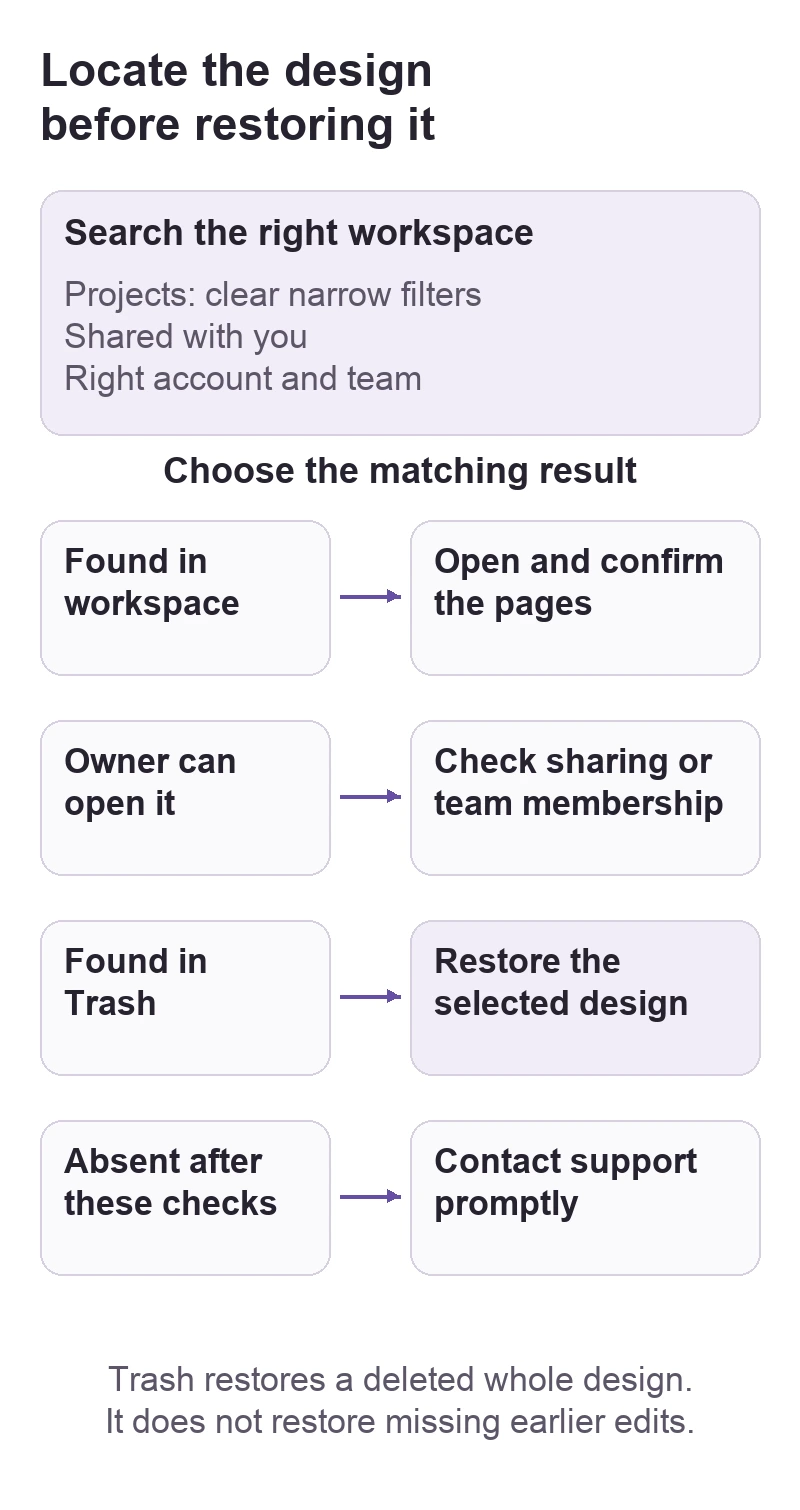
Start in Projects with the account and team that held the design. Clear narrow search filters and check Shared with you if someone else created it. Only move to Trash recovery after those checks: a design missing from Recents may still exist elsewhere.
In this guide
Canva in a desktop browser. Covers locating a whole design and restoring a deleted design from Trash. Restoring earlier edits in an existing design, recovering a deleted team, and missing local downloads are separate workflows.
Search the right workspace before restoring anything
Keep an old invitation, design link, or downloaded copy if you have one. These can help identify the intended design. Do not delete similar copies, leave a team, or empty Trash while looking for it.
Broaden the search without changing the design
From the homepage, search a distinctive part of the title. In the search results, check Owner, Category, and Date modified. A filter for designs you own can hide a colleague's work; a recent date range can hide a design you have not edited lately. Canva documents these controls in Finding your designs and folders.
Start with Any owner and clear the other filters. Then narrow the results when you recognize the likely title or thumbnail. For example, searching a client name with a poster-only filter is unhelpful if the original was a presentation.
Open Projects > Shared with you for a design made by someone else. Finding a file there establishes its location; if it opens but editing is unavailable, follow the shared-design access checks.
Check another account or team
On the homepage, open your profile icon and inspect Switch team, if present. Search Projects in the team where the design was made. If you need to try another sign-in, save current work and make sure you can sign back in first. Use the known email or sign-in method rather than creating another account.
Canva's missing-design guide distinguishes account, team, and membership problems. If an administrator removed you from the owning team, ask them to check your membership. An empty personal workspace does not prove the team's design was deleted.
| What you find | What it means for the next step |
|---|---|
| The design appears after clearing filters | Open it and confirm its pages; no restoration is needed. |
| It appears in another team | Continue in that workspace. |
| Its owner can open it but you cannot | Check sharing or team membership. |
| The design itself appears in Trash | Restore that item. |
Restore the design from Trash
Canva's Trash guide says deleted designs stay there for 30 days. From the homepage, open Projects > Trash, use the Designs tab, select the intended item, and choose Restore in the action bar. Confirm when prompted, then locate it in Projects.
Check the restored design's title, page count, and a recognizable page before editing it. A similarly named template or an older duplicate may not be the design you need.
Do not select Empty Trash as a refresh step. If a design has already left Trash, contact Canva Support promptly through its recovery help. Canva describes a 14-day support window for designs deleted from Trash; recovery is a possibility, not a guarantee. A missing folder and a deleted design are also different: search for the individual designs that were inside it.
For support, provide the design link if available, approximate last-access date, owning team, and which of the checks above failed. Send account details through Canva's support route, not a public post. If the design still exists but an earlier edit is missing, Trash is the wrong tool; Canva directs that case to Version History.
Sources
Based on official documentation; not independently tested. Sources checked Oct 3, 2026. How we review guides
Something out of date? Let us know.
Related fixes
Canva animation disappears from the downloaded file
Choose a motion format, confirm the right pages, and separate an export problem from a preview or destination that only shows a still image.
Canva prints with white edges: check bleed before exporting
Find whether a white border comes from the design edge, PDF export, or the way the page is printed and trimmed.
 Canva
CanvaCanva keeps selecting the wrong element
Use Layers to reach covered text or artwork, then distinguish an overlap from a group or an editing restriction.