After Effects vector artwork looks soft when enlarged
Check whether the source is vector or raster, enable continuous rasterization on an imported vector layer, and inspect precomposition behavior before changing the design.
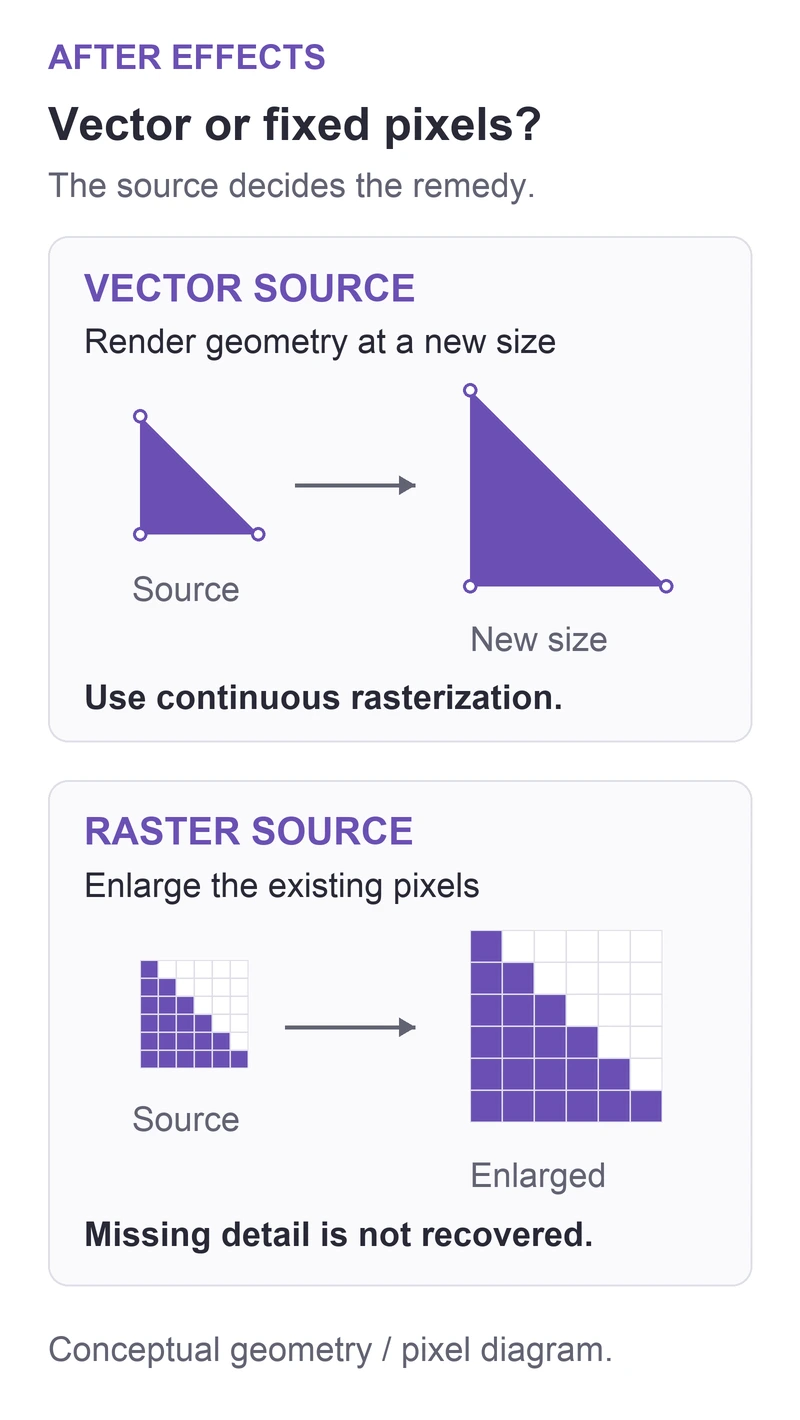
For imported vector artwork that becomes soft above 100% Scale, inspect the layer's Continuously Rasterize switch in the Timeline. That remedy depends on a vector source. A PNG or JPEG contains a fixed pixel grid; the same switch cannot recover detail that its source never contained.
In this guide
After Effects desktop on Windows or macOS. Imported vector footage and simple nested compositions; raster images, native text/shape layers, and 3D/effect-heavy precompositions are distinguished. Does not promise that an arbitrary Illustrator file contains only vector artwork or that every effect remains unchanged.
Check the artwork type before changing its scale
Save a project copy before changing a finished animation. Compare a stationary frame where a sharp edge is easy to recognize.
Follow the layer back to its source
Confirm whether the selected layer is an imported vector item, a raster image, or a precomposition. A renamed layer called "Logo" does not identify its file type. Ask the artwork supplier for the original source if the project only contains a small raster export.
Adobe's vector and raster overview explains the difference: vector geometry can be rendered at a new size, while enlarging a raster uses its existing pixels.
| Source you have | First action |
|---|---|
| Illustrator artwork with vector content | Inspect continuous rasterization on that footage layer |
| PNG or JPEG | Obtain a larger raster or a suitable vector original |
| Native text or shape layer | These already rasterize continuously; inspect preview and effects |
| Precomposition | Open it and identify the artwork layer inside |
Renaming an extension does not change the artwork type.
Enable the switch on the vector footage layer
Select the imported vector layer. Press F4 if the Timeline shows Modes instead of Switches. In the Collapse Transformations/Continuously Rasterize column, enable the switch for that layer. Keep its intended Scale unchanged and compare the same edge again.
Adobe's layer reference documents support for Illustrator, PDF, and EPS footage, among other vector formats. It also notes that native text and shape layers already use continuous rasterization.
Treat a precomposition as a separate decision
The switch in the same column means Collapse Transformations on a precomposition. It can preserve detail through nested scaling, but it also changes render behavior. Open the nested composition and check its actual vector layer first; do not enable every switch across the project.
If you also change the outer precomposition's switch, compare masks, effects, and any 3D interaction throughout the affected passage. Adobe's nesting and render-order reference explains why collapsing is more than a sharpness setting. Restore the earlier state if the composition changes in an unintended way.
Separate a preview shortcut from the delivered picture
For the comparison, use Full in the Composition panel's resolution menu and Layer > Quality > Best on the affected layer. Lower preview resolution is useful for working quickly, but it is a poor basis for judging a fine edge. Adobe covers downsampling in its preview guide.
Render a short sample under a new filename and inspect the actual saved image at its intended display size. If only working playback is reduced or slow, use the preview troubleshooting guide. If softness remains in the render, use the Community link in the layer reference with the source type, scaling location, and a small non-sensitive example. A faster preview or a larger output frame alone does not establish that the source has more detail.
Sources
Based on official documentation; not independently tested. Sources checked Oct 3, 2026. How we review guides
Something out of date? Let us know.
Related fixes
After Effects hides the last lines of a text box
Check paragraph-text overflow and enlarge the text box without scaling the lettering or discarding hidden characters.
An After Effects layer rotates around the wrong point
Move the layer anchor to the intended pivot without confusing it with centering the layer in the composition.
Send an After Effects project with its footage intact
An AEP file references media rather than carrying it all inside. Collect the footage, keep the folder together, and check dependencies before delivery.